Statistical Foundation
Peterman Ratings expresses 95% confidence that a player’s true skill level lies within:
Mean ± 2 × Uncertainty
Each match provides new information. As a result, a player’s uncertainty will either decrease or remain the same over time.
However, if a player takes a break from competition, uncertainty increases at a fixed annual rate to reflect reduced recent evidence of performance.
Players with higher uncertainty experience larger rating adjustments. This allows infrequent or new players to find their appropriate level more quickly.
The magnitude of any rating change depends on:
- The mean rating difference between opponents
- The match set score
- Each player’s uncertainty
Why Set Scores Matter
Peterman Ratings operates at a granular level. It does not treat all wins and losses equally — the scoreline matters.
In some rating systems, the same number of points is deducted from the loser regardless of how close the match was.
Peterman Ratings takes a fairer approach by incorporating the set score into the calculation.
For example:
- If a stronger player wins 2–1 when the system expected a straight-sets victory, the winner receives fewer points than expected, and the weaker player loses fewer points.
- If a stronger player drops a set while “testing” tactics, their rating reflects that underperformance.
- Conversely, a straight-sets win earns more points than a win where a set was conceded.
This approach discourages stronger players from easing off or experimenting mid-match. Every point matters.
The system rewards decisive performance and recognises competitive resistance.
Not a Zero-Sum System
Peterman Ratings is not strictly zero-sum. The points gained by the winner do not always equal the points lost by the loser.
The only time rating transfers balance exactly is when both players have identical uncertainty levels.
This flexibility allows the system to more accurately reflect evolving skill levels rather than simply redistributing fixed points.
For example, when a new player with high uncertainty competes against an established low-uncertainty player, rating adjustments are asymmetric. An upset win can result in a significant increase for the newcomer while only a modest decrease for the established player. Conversely, an expected loss may lead to a larger correction for the newcomer and only a small gain for the established player.
Event Reports, Rating Trails & Activity Incentives
By clicking on an event hyperlink under "Events," you can access a detailed match-by-match report of a specific tournament or pennant fixture. The page includes the event description, hosting club, type of match (singles or doubles), date, and location. The winner is displayed on the left and the defeated on the right, following the order of data entry. The report shows the Previous Rating, Rating Change, New Rating, and Set Score. Matches should be listed in chronological order, with the oldest ones appearing first, and the most recent ones at the end. If the event was a tournament, the round of 32 matches would appear at the top, with the winner and runner-up at the bottom. The website is hyperlinked, allowing you to click on a player or team name to view their profile page, which summarises their performance in each event. Additionally, if a player competes against the same player more than once in an event, you can track their ratings trail as they play subsequent matches:
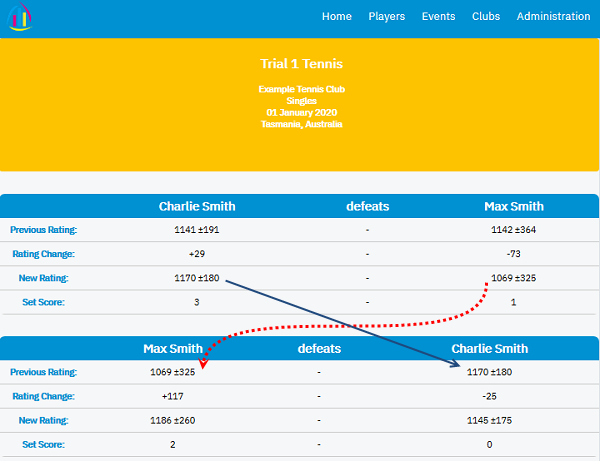
In the two-match event described above, Max and Charlie's initial means were almost identical, but Max had higher uncertainty compared to Charlie, which was nearly twice as much. This meant that we were more certain about Charlie's rating, leading to Max losing 73 points in the first match, while Charlie gained 29 points. In the second match, Max's uncertainty remained high, and he gained 117 points, while Charlie lost 25 points, technically making it an upset.
To encourage regular play, the system favors players who play frequently, as their increase in uncertainty will be small. Regular players are less likely to lose more points in the event of an upset than players who have been dormant for an extended period before the event. This aspect of the model is designed to incentivise players to compete regularly rather than staying out to protect their ratings.
Furthermore, to encourage dormant players to become active again, their mean will increase by a small amount each year, but they will not receive these points until they play again. This mechanism, combined with the increase in uncertainty outlined above, ensures that points are injected into the system, preventing deflation of ratings. Deflation in ratings systems can lead to players being stronger than their calculated ratings suggest.
Notes for Contest Managers
To ensure effective management of clubs, each club must nominate at least one Contest Manager. If a club is large, it can have more than one Contest Manager to handle all responsibilities. Contest Managers are responsible for maintaining players' details and uploading events such as tournaments and pennants for their club. They can also add or remove another Contest Manager for the same club and edit player details and events only for their club.
Administrators have the authority to manage all clubs, including adding or deleting another Administrator or Contest Manager. They can update players' wins and losses and correct false information. Additionally, Administrators can update events and players of all available clubs in the system. Presently, the Site Owner is the only Administrator.
Before entering players into their club, Contest Managers should check if the player already exists on the system by navigating to Club Administration > Club Members > "Add Existing Players". They should search for the player's family name and, if found, add them to the club. If not found, they can click the "Add New Player" button and fill out the form. It is the Contest Manager's responsibility to verify the identity of new club members who express interest in playing a tournament or pennant using photo ID. This is to prevent the same player from having multiple ratings on the site due to different names or misspelled names. The "One Name - One Rating" policy applies.
Contest Managers must choose an initial prior for each of their club players, based on whether they are Novice, Intermediate, or Advanced. A custom rating can be chosen, but it must be within the range of 650-2000 and paired with an appropriate rating uncertainty. For new clubs using Peterman Ratings, all Div 3 players can be given an initial rating of "Novice," all Div 2 can be given an initial rating of "Intermediate," and all Div 1 can be given an initial rating of "Advanced." It is good practice to play unknown players against a known player in the green zone to estimate their ability and assign an appropriate rating. Once the system has processed some singles events, new players can be slotted in according to their estimated abilities.
When a club adopts PMR, individuals, whether they are longstanding players or new, will be given a rating that best describes their ability according to the Contest Manager. High-uncertainty players will need to play several matches to get an accurate rating (colored green: uncertainty<40). As the group plays more matches and most players' ratings settle into the amber and green zones, new entrants' ratings will become accurate more quickly.
Contest Managers should upload events to Peterman Ratings as soon as possible after they are complete. If a player is a member of another club using the same system, there could be discrepancies in rating and date ordering.
When submitting events, they must have some sort of definite structure, such as round-robin, single or double elimination, team match, league match, ladder, or winner stays. Events must be open to some segment of the public, and publicity is required, such as mailing or emailing entry forms, posting a notice on a club website, handing out flyers, or posting a notice in the club. Two players playing against each other multiple times at the club is not an acceptable event. All matches that are part of the event must be submitted, not just some of them.
Once a player's details have been added for one type of sport (like tennis), there is no need to add their details again if they play another sport listed on the system
Seasonal Age Eligibility (Australian Rules)
Peterman Ratings automatically calculates junior and veteran eligibility using official Australian seasonal rules.
Junior and Open categories are determined by a player’s age on 1 January of the competition year, while Veteran categories are determined by age on 31 December of the previous year.
This removes confusion about whether a player “turns” a qualifying age mid-season and ensures consistent, dispute-free eligibility across all events.
Clubs no longer need to manually calculate age brackets — the system does it accurately and automatically.
Data Input
To input the matches in the correct order, there are two methods available. The first is to enter them "on the fly" as they are being played, while the second involves using comma-separated values (CSV) data for easy updating of player ratings.
To use the first method, select "Upload Event" under Administration and upload frequently during the session to avoid losing information. You can then edit the event when a new match is entered. For the second method, wait until all matches have been played and select "Upload CSV" under Administration. A link is provided to obtain a table of club members and their PMR ids, which is updated automatically when a new player is added to PMR. Copy-paste this table into a spreadsheet worksheet, convert it to CSV, and then paste it into the designated field. Fill in all relevant fields and click upload. If you have any questions or need assistance, please contact PMR at the email address below.
After the Contest Manager uploads the new event data and the matches have been processed, all players who participated in the event will receive an email with their win/loss status for each match played and their updated rating. The email, titled "Your Rating Has Been Updated," will appear to come from the website, but the "reply to" field will show the Contest Manager's email address. It is important to inform your players about this website and to check their junk mail if they are not receiving messages. If the messages are in the junk mail, they can be labeled as "not junk." Players can also choose to unsubscribe if they do not wish to receive any further communication.
Finally, if you are new to this process, Peterman has created a series of short explanation-by-example videos to help get you started:
Click here to see how to Add New Players to your club and add existing ones
Click here to see how to Add Existing Players to your club who havn't yet got a rating for a new sport
Click here to see how to Add a New Player to your club at the Upload Event stage
Click here to see how to Add a New Player with a long or hyphenated name to your club
Click here to see how to Upload a Singles Event
Click here to see how to Upload a Doubles Event
Click here to see how to Edit An Event
Click here to see how to Add another Contest Manager for your club
Click here to see how to Add another Contest Manager for your club (Alternative method)
Click here to see how to Reset Your Password
Click here to see how to add CSV data (and add another player)
Drawn matches, Did Not Finish, Retirement due to injury, Forfeits and Walkovers
In the Peterman Ratings system, match outcomes are limited to either a win or a loss. Draws are not recognized, which is consistent with the nature of win-loss sports. If a match is abandoned due to time constraints, injury retirements, or bad weather (in tennis, for instance), it cannot be included in the Peterman Ratings. Likewise, forfeits and walkovers should not be recorded in the Peterman Ratings.
Acknowledgments
I would like to express my gratitude to my mentor Barrie for his invaluable statistical contribution. I am also grateful to Tom Leslie, Carl Love, and "Acer" (who prefers to maintain anonymity) for their assistance in coding Maple, which was of great help. As the project needed to be deployed on the World Wide Web, it was presented to third-year IT students at UTAS for consideration. I am thankful to the professor in charge for providing this fantastic opportunity. The website was constructed from scratch using a blend of web technologies, and the math engine behind it is fueled by
Maple™.
Maple is a high-end software, and only the finest quality is acceptable. I would like to express my gratitude to the exceptional team members who worked on this project. Marcus served as the Project Manager, while James and Grant were the Co-Lead Programmers. Harinder led the Documentation efforts, Adib was the Client Liaison, and Yusuf and Mingxin were the Co-Lead Designers. Once the project was completed in October, James, one of the developers, was hired to refine the "rough diamond" that was handed to me. I extend my heartfelt appreciation to all of these individuals for making my vision a reality.
For my mum
4th April 1934 - 3rd May 2020
Mr Peterman BAppSc
info@petermanratings.com
Account Information
FOR CLUB MANAGERS ONLY, if you are looking for your rating, event results or club, please visit the Home page
Forgot Password
Enter your email address and we'll send you a password reset email
Email sent!
Notification placeholder text here to be changed in JS.